410 Santa Maria, Irvine, CA 92606
E-mail us: [email protected]
7 Days a Week

A Whirlpool dishwasher F8 E4 warning can signal water in the drip tray, excessive suds, or a float-switch connection problem. Learn why the dishwasher may drain automatically, what to inspect safely, and when resetting the code is not enough.
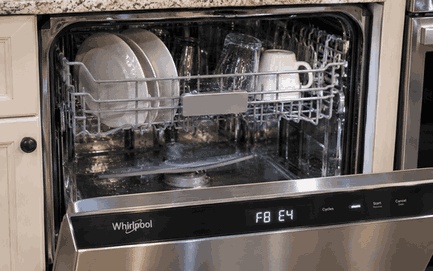
A Whirlpool dishwasher F8 E4 error code indicates an overfill or leak-protection condition on compatible models
A Whirlpool dishwasher F8 E4 error code indicates an overfill or leak-protection condition on compatible models. Water detected in the lower drip tray, a loose float-switch connection, or excessive detergent suds can activate the warning.
The dishwasher may sound an alarm, interrupt normal operation, and automatically begin draining water. The error does not necessarily mean an expensive component has failed.
Before attempting a reset, follow the protective-drain instructions for your Whirlpool model and investigate any signs of moisture or recent installation problems.
The F8 E4 warning, sometimes displayed as F8E4, identifies a condition involving the dishwasher's drip tray or associated overfill-protection system.
Many compatible Whirlpool dishwashers use a float switch to detect water collecting beneath the washing chamber.
When the protection system activates, the dishwasher may stop its washing program and initiate a drain sequence to reduce the risk of additional water accumulation.
However, F8E4 does not automatically confirm a defective water inlet valve, float switch, or electronic control board.
The warning identifies a condition requiring investigation rather than one specific failed component.
For additional manufacturer-specific warnings, explore our Whirlpool appliance error code guide.
Several operating and installation problems can trigger a Whirlpool dishwasher overfill or leak-detection warning.
Water may reach the lower drip tray because of a leaking supply connection, damaged internal seal, restricted or loose hose connection, or another water-carrying component.
The protection system can detect moisture before water becomes visible around the appliance.
A dry kitchen floor does not rule out a hidden dishwasher leak.
If water has collected beneath the washing chamber, professional inspection may be needed to identify the source and determine whether a component requires repair.
Whirlpool identifies the drip-tray float-switch connector as a potential source of F8E4 warnings, particularly after dishwasher installation.
If the connector is loose, disconnected, or improperly seated, the protection system may not operate as intended.
Checking this connection may require access to concealed electrical components.
Because the float-switch wiring is attached to the lower assembly on applicable models, internal inspection should be performed by a qualified installer or appliance technician.
Using ordinary hand dish soap, excessive dishwasher detergent, or dishes carrying concentrated soap residue can create excessive foam.
These suds may escape the normal washing area and reach the dishwasher's lower drip tray.
If F8E4 appeared after changing detergent, consider whether oversudsing contributed to the warning.
Use only products intended for automatic dishwashers and follow the recommended dosage.
When the dishwasher displays F8E4, prioritize water and electrical safety before attempting any troubleshooting.
Whirlpool provides specific instructions for certain professionally installed dishwashers when F8E4 activates a protective drain sequence.
For applicable models, these instructions include:
Turn off the dishwasher's water supply if it is safely accessible.
Press Cancel once to silence the alarm.
Keep the dishwasher door closed.
Follow the model-specific instructions concerning electrical power while protective draining completes.
Some Whirlpool instructions direct owners to leave electrical power on while protective draining is underway. Other model instructions specify different power-isolation procedures depending on the circumstances.
Always follow the instructions supplied with your exact dishwasher.
Never access wiring, remove electrical components, or work inside the appliance while it is energized.
If water has reached electrical connections, avoid contact and request qualified assistance.
Inspect the floor, cabinet base, dishwasher door perimeter, and visible water supply connections.
Look for:
Water droplets or damp surfaces near the dishwasher.
Signs of leakage around accessible connections.
Excessive detergent foam near the door opening.
Moisture appearing during filling, washing, or draining.
Photograph any visible water before cleaning it.
Record when the warning appeared and whether the dishwasher had recently been installed, moved, or serviced.
On some Whirlpool models, the lower drip tray includes an attached float-switch wire.
Pulling the tray incorrectly can damage the wiring or create an additional electrical fault.
Do not remove concealed panels, disconnect unfamiliar components, or pull the dishwasher from its cabinet without appropriate instructions and safety precautions.
If internal access is necessary, professional dishwasher repair and diagnostics can help identify the problem without unnecessary component replacement.
Confirm that the detergent is designed for automatic dishwashers.
If excessive foam is present, record the product name and quantity used.
Do not add vinegar, additional cleaning chemicals, or homemade mixtures while the F8 E4 protection warning remains active.
An F8E4 error shortly after dishwasher installation deserves particular attention.
Possible contributing conditions include incorrectly positioned water supply connections, leaking fittings, damaged seals, or a float-switch connector that was not properly secured.
The error may also appear after the appliance has been moved during flooring installation or cabinet modifications.
These details can help identify the most relevant inspection points.
However, the timing alone does not establish that an installation mistake occurred.
If the warning appeared immediately after installation, contact the installer or request professional dishwasher diagnostics before operating the appliance again.
Whirlpool describes using the Cancel button to silence the warning and, under applicable conditions, clear the displayed code.
On certain models, pressing Cancel once silences the alarm and pressing it again clears the code.
However, clearing F8E4 is not the same as repairing the underlying problem.
A reset cannot correct:
A leaking supply connection or internal hose.
Water accumulating in the dishwasher's drip tray.
A disconnected or damaged float-switch connection.
Excessive suds or another recurring leakage condition.
Do not repeatedly reset the dishwasher while moisture continues accumulating or the protective drain sequence remains active.
If the warning returns after the appropriate checks, professional diagnosis should determine why the protection system activated.
Not necessarily. Water in the drip tray, excessive detergent suds, or a float-switch connection problem may activate the warning.
The actual cause requires investigation before replacing any components.
Only follow the removal and drying procedure specified for your exact dishwasher model.
The lower tray may have attached electrical wiring, and improper removal can damage the float-switch connection.
If the procedure is unfamiliar or access is unsafe, request professional assistance.
No. The Cancel button may silence the alarm or clear the displayed warning on compatible models, but it does not eliminate a leak or correct a faulty connection.
The dishwasher may automatically activate its drain system as part of the overfill or leak-protection response.
This protective behavior does not independently confirm that the drain pump is defective.
Reliable Hands Appliance provides professional residential dishwasher diagnostics and repair throughout Irvine, Costa Mesa, Newport Beach, Santa Ana, Tustin, and surrounding Orange County communities.
Our dishwasher services address water leaks, overfill warnings, drainage issues, float-switch problems, damaged connections, and electronic control faults.
For homeowners in Newport Beach, explore our Whirlpool appliance repair services in Newport Beach or learn more about local dishwasher repair for leaks and water-related problems.
When requesting service, provide your Whirlpool dishwasher model number, the complete F8 E4 warning, and details about recent installation, plumbing work, or previous troubleshooting.
This information helps the technician investigate the appropriate components and determine which repairs may be necessary.
If your Whirlpool dishwasher continues displaying F8E4, repeatedly activates its protective drain system, or shows signs of a hidden leak, contact Reliable Hands Appliance to request professional inspection and repair.
Business Name: Reliable Hands Appliance
Phone: +1 (714) 338-9438
Email: [email protected]
Address: 410 Santa Maria, Irvine, CA 92606, United States
Hours: Monday – Saturday: 8:00 AM – 7:00 PM; Sunday: Closed