410 Santa Maria, Irvine, CA 92606
E-mail us: [email protected]
7 Days a Week

A Samsung dishwasher LC error can appear without visible water on the floor. Learn how the leak-protection system works, what may trigger the warning, and which checks are safe before requesting professional repair.
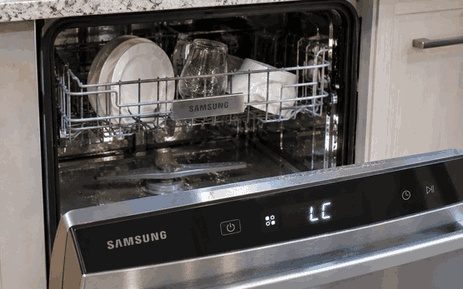
A Samsung dishwasher LC error code indicates that the appliance has detected moisture in an area monitored by its leak-protection system. The warning can appear even when no water is visible on your kitchen floor. In some cases, the dishwasher may continue running its drain pump after you press Power.
The LC warning does not automatically mean the sensor or drain pump is defective. Understanding the possible causes and performing safe, accessible checks can help determine whether the problem involves hidden moisture, detergent, installation, or a component requiring professional diagnosis.
The LC or LE error code on a Samsung dishwasher indicates that its leak-detection system has identified moisture where it should not be.
When this happens, the dishwasher may activate its drain pump to help prevent additional water accumulation. The appliance can appear to remain active even after normal operation has been stopped.
This is a protective response, not confirmation that a particular component has failed.
For other model-dependent warnings, consult our Samsung appliance error code guide.
A Samsung dishwasher showing LC without visible water can have several possible explanations. Moisture may be trapped beneath the appliance, or recent operating and installation conditions may have triggered the warning.
Moisture can collect underneath the wash chamber, where it is difficult to see without removing protective panels.
Possible sources include internal water connections, supply components, drainage connections, or water escaping around the dishwasher door.
A dry kitchen floor does not rule out a hidden leak. The sensor may detect moisture before it reaches surrounding cabinetry.
Using incorrect detergent can create excessive suds that escape the dishwasher's normal washing area.
Possible contributing factors include:
Using regular hand dish soap instead of automatic dishwasher detergent.
Overfilling the detergent dispenser.
Leaving concentrated detergent residue inside the appliance.
Using cleaning products incompatible with the dishwasher.
If the warning followed a detergent change, record that information. Do not add another cleaning product while the dishwasher displays LC.
If the Samsung LC warning appeared after installation or plumbing modifications, consider whether the dishwasher was moved or its connections were changed.
A newly installed garbage disposal may still contain its dishwasher-inlet knockout plug, interfering with normal drainage. Appliance movement may also displace residual water toward the monitored area.
These details can help a technician determine where to begin inspection.
Certain Samsung WaterWall dishwashers use a moving water reflector.
Samsung identifies reflector obstructions as a possible consideration on applicable models. Check whether your dishwasher has WaterWall technology before applying this explanation.
A reflector problem should not be assumed to explain every LC warning.
Before attempting Samsung dishwasher LC troubleshooting, prioritize electrical safety and avoid accessing concealed components.
Samsung recommends disconnecting the dishwasher from electrical power when investigating an LC warning without visible leakage.
Unplug the appliance or switch off its circuit breaker, following the manufacturer's instructions.
If an active leak is suspected, close the accessible water supply valve when safe to do so.
Never touch wet electrical outlets, exposed wiring, or damaged connections.
Check around the dishwasher door, nearby cabinets, flooring, and accessible water supply connections.
Look for visible signs of moisture, dripping, or water accumulation.
Photograph any visible moisture and note whether the LC error appeared during filling, washing, or draining.
Also record recent detergent changes, plumbing work, or appliance movement. These observations can help narrow the possible cause.
Do not pull a built-in dishwasher from its cabinet, disconnect concealed hoses, tilt the appliance, or bypass its leak sensor.
Internal inspection requires appropriate electrical isolation and access procedures.
If the suspected moisture source is inaccessible, professional dishwasher repair and diagnostics is the safer approach.
Confirm that your detergent is specifically intended for automatic dishwashers.
Consider whether the warning appeared after a detergent change, garbage disposal replacement, or recent dishwasher installation.
If the issue began after installation, ask the installer to verify the water and drainage connections.
Samsung acknowledges that moisture displaced during appliance movement may eventually evaporate.
Keep electrical power disconnected during the manufacturer-recommended drying period.
However, allowing moisture to dry does not repair an active leak.
If LC remains or returns, request professional diagnosis rather than repeatedly restarting the appliance.
A recurring Samsung dishwasher LC error may indicate continued moisture intrusion, an installation problem, or a fault affecting the leak-detection system.
The timing of the warning can provide useful information.
An error appearing immediately after filling may require a different investigation from one appearing during washing or following plumbing work.
Professional diagnosis should identify the actual source before replacing sensors, pumps, or other components.
Although both codes can involve the dishwasher's water-handling systems, they indicate different conditions.
Samsung LC or LE relates to leak detection. The dishwasher may operate its drain pump as part of its protective response.
Samsung 5C indicates a drainage problem on compatible models, meaning water is not leaving the appliance as expected.
A continuously running drain pump during LC does not necessarily mean the dishwasher has a drainage failure.
If standing water remains after a wash cycle, our guide explaining why a dishwasher is not draining covers common restrictions, pump problems, and drainage connections.
Yes. The Samsung leak sensor can detect hidden moisture beneath the washing chamber. An apparently dry kitchen does not establish that the warning is false.
Not necessarily. The sensor may be responding correctly to moisture. Replacing it without identifying the source can leave the actual problem unresolved.
Some Samsung dishwashers automatically activate the drain pump when the leak-protection system detects moisture. This behavior helps prevent further water accumulation and does not independently confirm pump failure.
Resume operation only after the underlying condition has been addressed and the manufacturer's instructions permit it.
Recurring leak warnings require further assessment.
Reliable Hands Appliance provides residential dishwasher diagnostics and repair throughout Irvine, Costa Mesa, Newport Beach, Santa Ana, Tustin, and surrounding Orange County communities.
Our Samsung appliance repair services in Orange County address problems involving water leaks, drainage systems, water connections, sensors, and electronic controls.
Homeowners can also explore Samsung appliance repair in Irvine or request dishwasher repair in Newport Beach for locally relevant service information.
When requesting assistance, provide your complete Samsung model number, the displayed LC warning, and details about visible moisture, recent installation work, or previous troubleshooting.
If your Samsung dishwasher continues displaying LC, repeatedly activates its drain pump, or shows signs of a hidden leak, contact Reliable Hands Appliance to request professional inspection and repair.
Business Name: Reliable Hands Appliance
Phone: +1 (714) 338-9438
Email: [email protected]
Address: 410 Santa Maria, Irvine, CA 92606, United States
Hours: Monday – Saturday: 8:00 AM – 7:00 PM; Sunday: Closed