410 Santa Maria, Irvine, CA 92606
E-mail us: [email protected]
7 Days a Week

A Samsung dishwasher 5C error means wastewater is not draining properly. Learn how clogged filters, kinked hoses, blocked sink connections, and incorrect drain routing trigger the warning, with safe troubleshooting steps and repair guidance.
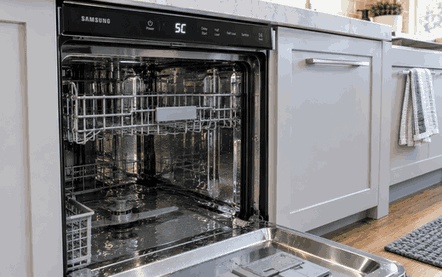
A Samsung dishwasher 5C error code means the appliance cannot drain wastewater correctly. Depending on the model, related warnings may appear as 5E, SC, or SE.
A Samsung dishwasher 5C error code means the appliance cannot drain wastewater correctly. Depending on the model, related warnings may appear as 5E, SC, or SE.
Common causes include a clogged filter, restricted drain hose, blocked sink connection, or incorrect installation. The dishwasher may stop its wash cycle or leave standing water inside the tub.
The warning does not automatically mean the drain pump needs replacement. Start with accessible drainage components and follow Samsung's model-specific instructions before considering internal repairs.
The 5C warning on a Samsung dishwasher identifies a drainage failure.
During normal operation, the dishwasher removes used water through its drain pump, discharge hose, and household wastewater connection.
If this process is interrupted, the appliance may stop its program or retain water inside the washing chamber.
Samsung 5C indicates unsuccessful drainage, not a confirmed defective pump.
For other manufacturer-specific warnings, explore our Samsung appliance error code guide.
Several restrictions and installation problems can interfere with normal wastewater removal.
Food particles, grease, labels, and small debris can accumulate around the dishwasher's filter and sump.
These obstructions may prevent wastewater from reaching the drain pump efficiently.
However, a clean dishwasher filter does not guarantee that the entire drainage system is clear.
A Samsung dishwasher drain hose can become trapped beneath the appliance during installation.
Samsung identifies a pinched hose as an important cause when drainage problems begin immediately after installation.
A bent, compressed, or damaged hose can restrict water discharge even when the pump operates normally.
Dishwashers commonly discharge wastewater through a connection beneath the kitchen sink.
If the household drain or garbage disposal is blocked, water may not leave the appliance correctly.
A newly installed garbage disposal may also retain the factory knockout plug in its dishwasher inlet, preventing normal discharge.
Improper hose routing can allow wastewater to flow backward into the dishwasher.
Depending on the installation and applicable requirements, an approved air gap or high-loop arrangement helps prevent backflow.
Incorrect positioning may explain why dirty water returns after the dishwasher has already drained.
Start with accessible components and avoid removing concealed plumbing or electrical connections.
Stop the washing cycle using the normal controls.
Allow hot water to cool before inspecting the washing chamber.
Photograph the 5C error code and note whether water remains inside or returns after the appliance has drained.
Water appearing after the dishwasher has stopped may indicate backflow from the household drain.
This differs from a dishwasher that never successfully emptied its tub.
Record when the water appears rather than assuming the drain pump has failed.
Disconnect electrical power safely before reaching into the drainage area.
Follow your Samsung model's instructions for filter access.
Some dishwashers have removable filter assemblies, while others use different arrangements.
Remove debris only from accessible areas and reinstall all components correctly.
Never reach blindly into standing water. Broken glass or sharp objects may be concealed near the filter.
Check whether the connected kitchen sink drains normally.
If the sink also drains slowly, the problem may involve household plumbing rather than the dishwasher.
If a garbage disposal was recently installed, ask the installer to confirm that its dishwasher inlet is open.
Never reach inside a connected disposal or disconnect unfamiliar plumbing components without appropriate precautions.
Inspect visible hose sections for sharp bends, compression, or damage.
Do not pull the dishwasher from its cabinet or disconnect concealed hoses without suitable assistance.
If Samsung dishwasher 5C appeared immediately after installation, ask the installer to verify the complete drain-hose arrangement.
Samsung recommends addressing the drainage problem before attempting to clear the warning.
A reset may remove the displayed code temporarily without correcting the blockage or installation problem.
Follow your model's approved restart instructions only after resolving an identified issue.
Do not repeatedly run full washing cycles while the dishwasher cannot drain.
If 5C returns, further diagnosis may be necessary.
A recurring Samsung dishwasher 5C error may involve an incomplete blockage, incorrect hose routing, or an internal drainage fault.
A technician may need to evaluate the drain pump, filter assembly, discharge hose, check valve, electrical connections, and electronic controls.
The goal is to identify where normal wastewater movement is interrupted before replacing components.
Our guide explaining why a dishwasher is not draining covers additional causes, including pump problems and wastewater backflow.
Professional dishwasher repair and diagnostics can distinguish between an obstructed drain path and a defective internal component.
Although these warnings involve water, they describe different problems.
5C, 5E, SC, or SE: The dishwasher cannot drain wastewater correctly.
LC or LE: The leak-protection system has detected moisture or a related leakage condition.
4C or 4E: The dishwasher is not receiving the required incoming water supply.
A dishwasher that cannot empty requires different checks from one that detects moisture beneath its washing chamber.
Always use the complete displayed code and model number when troubleshooting.
No. Clogged filters, restricted hoses, and household plumbing problems can prevent normal drainage.
A technician should confirm pump failure before recommending replacement.
Incorrect drain-hose routing, a restricted sink connection, or a check-valve problem may allow wastewater to flow backward.
The actual cause requires inspection.
No. Household chemical drain cleaners are not an appropriate treatment for dishwasher drainage faults.
Follow Samsung's approved cleaning instructions instead.
Yes. On compatible Samsung models, 5C, 5E, SC, and SE identify drainage problems.
The exact code format depends on the appliance model.
Reliable Hands Appliance provides professional residential dishwasher diagnostics and repair throughout Irvine, Costa Mesa, Newport Beach, Santa Ana, Tustin, and surrounding Orange County communities.
Our Samsung appliance repair services in Orange County address drain-pump problems, hose restrictions, electronic faults, and installation-related drainage issues.
Homeowners can also explore our dishwasher repair services in Newport Beach.
When requesting assistance, provide your Samsung dishwasher model number, displayed 5C warning, and details about standing water, recent installation, or plumbing work.
If your Samsung dishwasher continues displaying 5C, leaves standing water, or allows wastewater to return after draining, contact Reliable Hands Appliance to request professional diagnosis and repair.
Business Name: Reliable Hands Appliance
Phone: +1 (714) 338-9438
Email: [email protected]
Address: 410 Santa Maria, Irvine, CA 92606, United States
Hours: Monday – Saturday: 8:00 AM – 7:00 PM; Sunday: Closed
Time Zone: Pacific Time