410 Santa Maria, Irvine, CA 92606
E-mail us: [email protected]
7 Days a Week

LG Washer LE Error Code: Motor Lock Causes and Troubleshooting
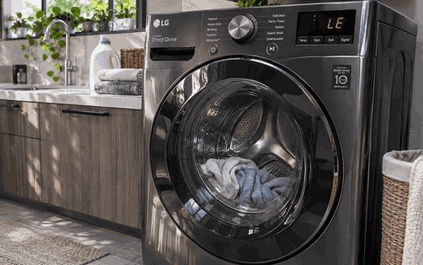
An LG washer LE error code indicates that the washing machine cannot rotate its drum properly
An LG washer LE error code indicates that the washing machine cannot rotate its drum properly. Often described as a motor-lock error, LE may appear because of excessive laundry, a trapped object, or temporary motor overload.
The warning does not automatically mean the motor needs replacement. Understanding what happened before the error appeared and performing safe, model-specific checks can help identify whether the washer needs a simple adjustment or professional diagnosis.
The LE code on an LG washing machine identifies a problem affecting drum rotation or motor operation. When the appliance cannot move the drum as expected, its control system may interrupt the cycle to protect internal components.
The warning can appear during washing, agitation, or spinning. What happened immediately before LE appeared is an important diagnostic clue.
LG's official troubleshooting guidance identifies overloaded laundry, foreign objects, consecutive washing cycles, and temporary motor faults as possible causes.
For other model-dependent warnings, explore our LG appliance error code guide.
Several operating conditions and mechanical problems can trigger an LG washer motor-lock error. Identifying the underlying cause is important before considering component replacement.
Washing bulky blankets, large comforters, or excessive laundry can place additional strain on the washer motor.
If LG washer LE appears during a heavy load, reduce the amount of clothing and select an appropriate bedding cycle when available.
Avoid repeatedly restarting an overloaded washing machine, as this may place additional stress on its drive system.
Coins, small metal objects, or other debris can become trapped around the drum or wash plate.
These obstructions may prevent normal movement or produce scraping, clicking, or unusual mechanical noises.
A visible foreign object does not necessarily indicate motor damage. However, anything requiring appliance disassembly should be handled professionally.
Running several laundry cycles consecutively can contribute to motor overheating or temporary shutdown.
LG recommends allowing approximately 30 minutes to one hour between repeated cycles when the motor needs time to cool.
If the LE warning returns during ordinary laundry use, further diagnosis may be necessary.
Before attempting LG washer LE troubleshooting, follow the manufacturer's instructions for your specific model. Do not force moving components or access concealed electrical parts.
Pause or stop the washing program using the appliance controls.
Photograph the displayed LE error code and note whether the drum stopped during washing, agitation, or spinning.
Wait until the door unlocks normally before removing laundry. Never force a locked door or reach into a moving drum.
If water remains inside, follow the manufacturer's safe drainage instructions.
If the washer was overloaded, remove excess clothing and redistribute bulky items.
Follow the manufacturer's load recommendations, particularly when washing comforters, blankets, or other heavy materials.
An appropriate load may allow the motor to resume normal operation when excessive weight caused the interruption.
Disconnect electrical power before inspecting visible areas around the drum.
Look for coins, metal objects, or trapped debris that may interfere with movement.
Remove only items that are clearly accessible without force or disassembly.
Do not reach beneath the drum, remove internal panels, or attempt to rotate obstructed components mechanically.
For applicable LG front-load washing machines, the manufacturer recommends a basic restart procedure when a temporary fault is suspected.
Safely disconnect the washing machine from electrical power.
Wait approximately five minutes.
Reconnect the appliance to power.
Check whether the LE warning has cleared.
Resume operation only if the washer is safe and no unresolved problem is evident.
A restart may clear a temporary interruption, but resetting the washer does not repair a mechanical obstruction or defective component.
If LE repeatedly returns, discontinue use and request professional inspection.
Although both washer designs can display LE, their mechanisms and troubleshooting procedures differ.
On front-load models, LE may appear when the drum cannot rotate normally because of excessive laundry weight, trapped objects, or temporary motor overload.
The appropriate checks depend on the washer's model and operating conditions.
Some LG top-load washers can display LE or LE1 when foreign objects interfere with movement around the wash plate.
LG's top-load troubleshooting instructions describe checking accessible gaps for trapped objects.
Always identify the complete model number before applying instructions intended for another washer design.
If LE returns after reducing the load and completing permitted checks, the issue may involve the motor system or another component affecting drum rotation.
Depending on the model, a technician may investigate:
Drive motor operation and mechanical resistance.
Rotor and stator components on applicable motor designs.
Motor-position sensing and related signals.
Electrical wiring and connections affecting motor operation.
Electronic control faults that interrupt drum movement.
These are potential diagnostic areas, not confirmed failures. Replacing components without proper testing can lead to unnecessary expenses.
For related symptoms, our washing machine not spinning guide explains other mechanical, electrical, and operating conditions that may prevent normal rotation.
No. Although these warnings can interrupt a washing program, they identify different operating problems.
LE: Motor operation or drum rotation problem.
UE: Laundry imbalance that prevents normal spinning.
OE: Water drainage problem.
An LG washer displaying LE should not automatically be diagnosed as having a drainage failure or an unbalanced load.
If the appliance retains water instead of draining, review our guide on why a washing machine is not draining.
Understanding the displayed code helps narrow the investigation, but the complete model number and actual symptoms remain essential.
Yes. Excessive laundry can strain the motor and prevent normal drum rotation. Reducing the load may help when overloading caused the interruption.
Not necessarily. The LE error indicates abnormal motor operation or drum rotation, but the cause may be temporary or related to an obstruction. Professional testing is needed to confirm component failure.
For applicable LG front-load models, a temporary error reset may involve disconnecting power for approximately five minutes. If repeated washing cycles have caused motor overheating, LG recommends allowing approximately 30 minutes to one hour for cooling.
Follow your model's operating instructions. If LE returns, unusual mechanical noises develop, or the washer stops spinning again, discontinue use and request professional inspection.
Reliable Hands Appliance provides professional washing machine diagnostics and repair throughout Irvine, Costa Mesa, Newport Beach, Santa Ana, Tustin, and surrounding Orange County communities.
Our residential washing machine repair services address problems involving motor operation, drum rotation, sensors, electrical connections, and electronic controls.
For manufacturer-specific assistance, explore our LG appliance repair services in Orange County.
Homeowners experiencing washer motor or spin problems can also find locally relevant information about washing machine repair in Newport Beach.
When requesting service, provide your LG washer model number, displayed LE code, laundry load details, and previous troubleshooting attempts. Mention any unusual noises or repeated interruptions.
If your LG washing machine continues displaying LE, cannot rotate its drum, or repeatedly stops during washing, contact Reliable Hands Appliance to request professional diagnosis and repair.
Business Name: Reliable Hands Appliance
Phone: +1 (714) 338-9438
Email: [email protected]
Address: 410 Santa Maria, Irvine, CA 92606, United States
Hours: Monday – Saturday: 8:00 AM – 7:00 PM; Sunday: Closed